Stake Betting App: Betting on Your Phone in Canada
From the bus home to the second intermission, most Stake bets in Canada are placed on a phone. Here's how the mobile experience works, how to set it up like an app, and how to keep your account locked down.
Canadian Edition tip. Keep your phone's time zone set correctly — start times on the board follow your device, whether you're on Pacific, Eastern or Newfoundland time.
 CA$100.00
A browser-based app experience
Rather than pushing you towards a big download, Stake is built as a responsive web platform. Open it in Safari or Chrome and the layout reshapes itself for a phone: menus collapse, the bet slip slides up from the bottom and match cards stack vertically.
Because everything runs on the same platform, your balance, open bets and settings sync instantly between phone, tablet and computer. Start a same game multi on your laptop and finish it on your phone.
Stay safe: only open Stake through a trusted link. Avoid "Stake APK" files offered by unknown websites — they aren't needed and can put your device at risk.

Add Stake to your home screen
A home-screen shortcut opens Stake full-screen with one tap, just like an installed app.
iPhone & iPad (Safari)
- Open Stake in Safari.
- Tap the Share icon at the bottom of the screen.
- Choose Add to Home Screen.
- Name the shortcut and tap Add.
Android (Chrome)
- Open Stake in Chrome.
- Tap the three-dot menu in the top corner.
- Select Add to Home screen.
- Confirm, then drag the icon where you like.
Finding your way around on mobile
Sports list
The menu holds every sport and esport, from Ice Hockey and Basketball to Cricket and CS2.
Quick search
Type a team — "Canucks" or "Raptors" — to jump straight to its fixtures.
Thumb-friendly slip
Selections collect in a slip that opens from the bottom, where you set your CA$ stake.
Open & settled
Track active tickets and review settled ones without leaving the sportsbook.
Live betting is where mobile shines
The Live Betting tab lists every event in progress with its current score. Tap into a game and the market list updates as the action unfolds — handy when you're watching a Jets game at a friend's place and want to back the next goal.
- Pre-match and live markets share one slip, so you can mix them in a multi where Stake allows it.
- Prices can change between tapping and confirming; review the final odds before you submit.
- Sports like tennis, table tennis and esports run around the clock, so there's live action at almost any hour.
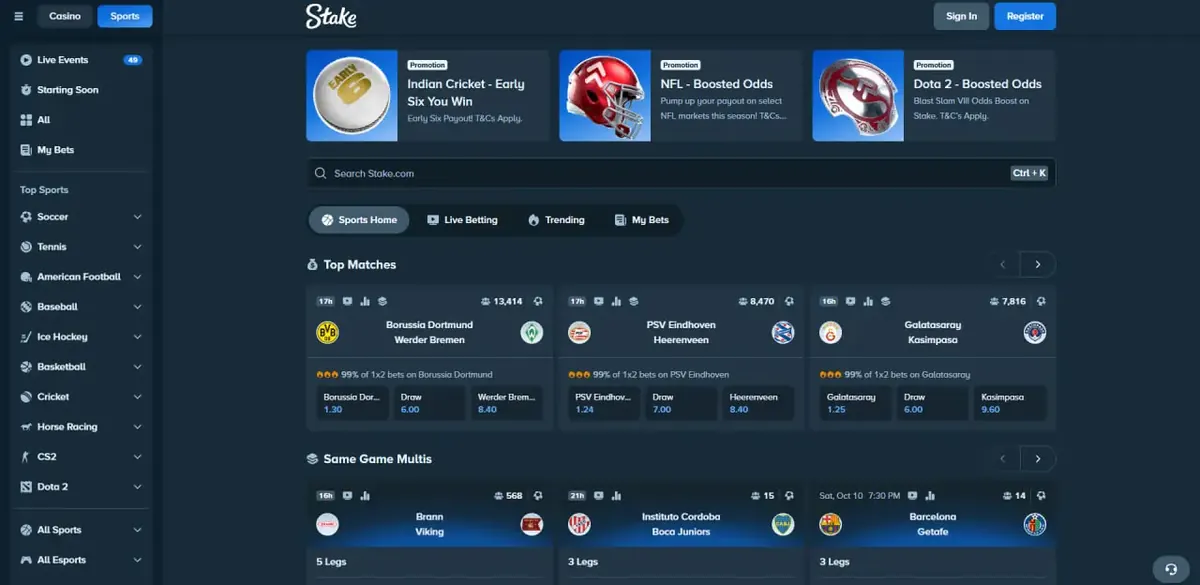
Mobile vs desktop at a glance
| Feature | Phone browser | Desktop |
|---|---|---|
| Sportsbook markets | Full list | Full list |
| Live betting | Yes, with scores | Yes, with wider layout |
| Stake casino | Available | Available |
| Wallet & cashier | Available | Available |
| Two-factor authentication | Set up in settings | Set up in settings |
| Best for | Quick live bets, checking slips | Research, building multis |
Smart habits for betting on mobile
Use a stable connection
Live bets depend on a quick response. Switch to Wi-Fi you trust or a strong LTE/5G signal before betting in-play.
Set limits in advance
It's easy to tap "place bet" one time too many on a phone. Decide a session budget — CA$25, CA$50 — before you start.
Lock it down
Turn on 2FA, keep your phone locked with Face ID or a PIN, and log out on shared devices.
Stake on mobile: FAQ
Take Stake with you
Open Stake on your phone, register with code GETRAKEBACK and unlock Rakeback in a couple of taps.